Which AI Image Tool Should You Use? Eight Tools, Rated for What They Do Best
Updated October 12, 2026.
Choosing an AI image tool used to mean choosing which one made the prettiest picture. Now the choice is more complicated, and more useful.
A portrait, a book illustration, a product photograph and an editable logo demand different things. Some tools help you discover a look. Others help you preserve one. Some give you a finished image; others give you material you can continue editing.
These are my editorial ratings for each tool’s strongest practical use, based on current documentation and available features. They are not scores from a controlled comparison. A 9 means an excellent fit; an 8 means a strong choice with meaningful compromises.
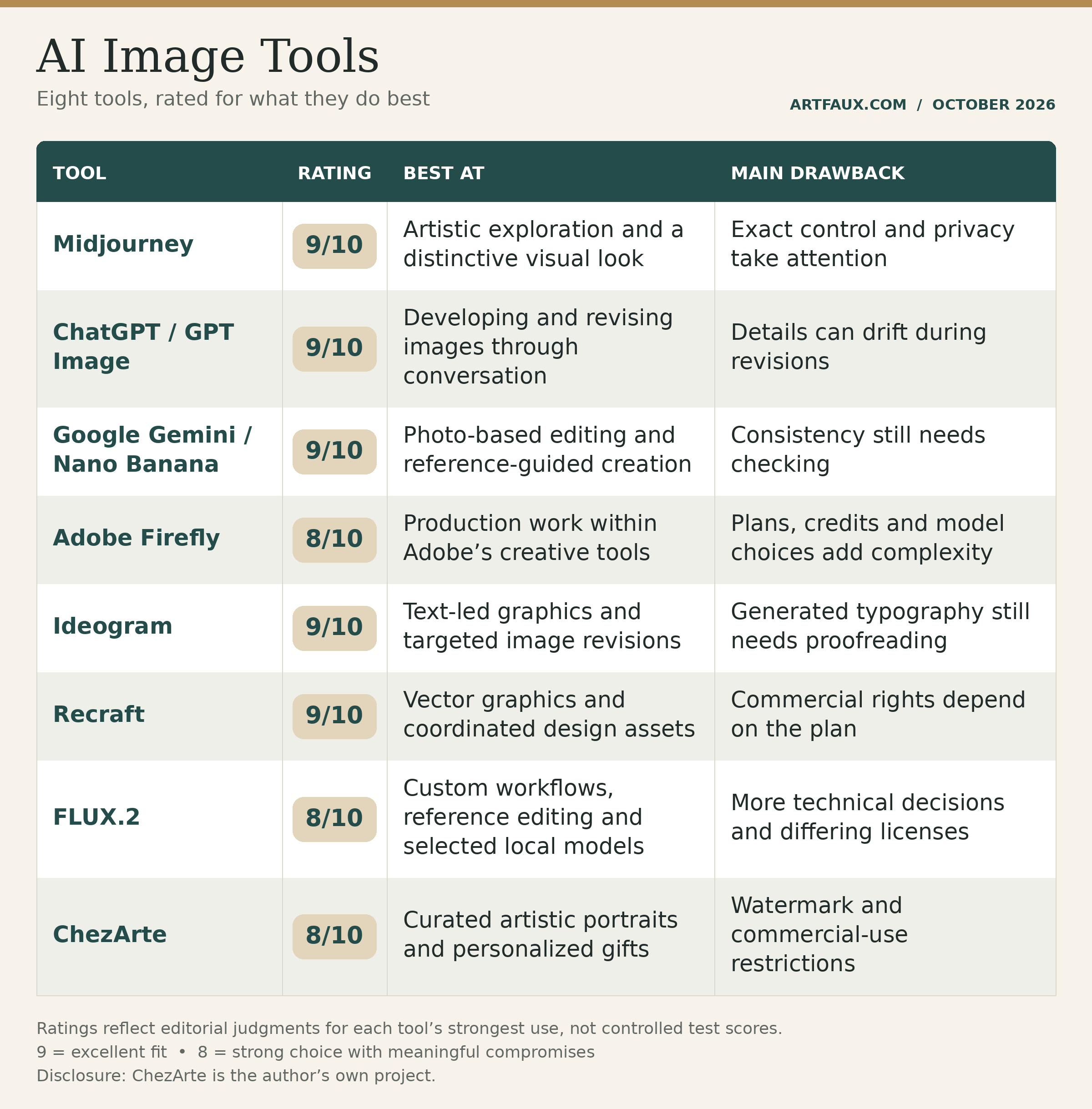
The scores describe suitability for those jobs. They do not establish that one tool produces better images in every situation.
Midjourney: for finding a visual direction
[Midjourney’s current default is V8.2](https://docs.midjourney.com/hc/en-us/articles/32199405667853-Version), with style references, personalization, moodboards and a newer editing model.
Benefits: Its emphasis on aesthetics makes it a compelling choice for exploring atmosphere, composition and a consistent visual character. I would shortlist it for concept art, imaginative environments and illustrations where the overall impression matters greatly.
Drawbacks: Its aesthetic preferences can require steering when your brief demands restraint or exact placement. Learning its controls takes time. Privacy also deserves attention: Midjourney is [open by default](https://docs.midjourney.com/hc/en-us/articles/28014645615373-Keeping-Your-Creations-Private), and private work requires the appropriate Stealth setup.
Best for: Artists who want to explore possibilities and develop a recognizable look.
ChatGPT / GPT Image: for working through an idea
[ChatGPT supports image creation and editing in conversation](https://learn.chatgpt.com/docs/image-generation). OpenAI’s current API also offers GPT Image 2.5 Sunburst for demanding quality and editing tasks, and Flare for
faster everyday generation. Model access varies by product.
Benefits: You can explain an idea, discuss what failed and request a focused revision in ordinary language. That makes it a useful starting point for editorial illustrations, thumbnails, visual explanations and image concepts that need several rounds of direction.
Drawbacks: Conversation does not guarantee precise execution. OpenAI documents continuing limitations in text placement, composition and recurring-character consistency. A revision can solve one problem while creating another. Dense lettering should receive a careful final check.
Best for: People who want to develop a brief and its image together.
[Source: OpenAI’s image-generation guide](https://developers.openai.com/api/docs/guides/image-generation).
Google Gemini / Nano Banana: for building from photographs
Google’s image tools include [Nano Banana 2 and Nano Banana Pro](https://blog.google/innovation-and-ai/technology/ai/nano-banana-2/). Google positions Nano Banana 2 around fast generation and editing, while retaining Pro for specialized, high-fidelity work.
Benefits: Reference-based creation is a major attraction. You can begin with a person, product or setting and request changes rather than describe everything from scratch. Google also documents subject consistency, improved text rendering and search grounding.
Drawbacks: Those capabilities are not guarantees. A face, garment or product detail still needs comparison with the original. Search grounding can improve the reference material without making every visual detail factual. Availability and limits depend on the Google product and account.
Best for: Photo transformations, scene changes and work guided by existing images.
Adobe Firefly: for getting work into production
[Firefly now includes Adobe models, partner models and custom-model workflows](https://blog.adobe.com/en/publish/2026/03/19/adobe-firefly-expands-video-image-creation-with-new-ai-capabilities-custom-models). Adobe’s Firefly Image 5 is generally available.
Benefits: Its appeal is the surrounding creative workflow: generate, remove or add elements, extend an image and continue refining the result with Adobe tools. For someone already working in that environment, this can save considerable friction.
Drawbacks: “Firefly” no longer describes just one model. Results, controls and costs can change with the selected model. Subscriptions and generation credits also require attention. Adobe’s commercial-use positioning should not be read as an unconditional guarantee covering every image, model and plan.
Best for: Designers and teams producing finished campaign material.
[Source: Adobe Firefly FAQ](https://helpx.adobe.com/sg/firefly/web/get-started/learn-the-basics/adobe-firefly-faq.html).
Ideogram: for words and careful changes
Ideogram’s current lineup includes [Ideogram 4.5](https://ideogram.ai/models/4.5/), which emphasizes precise editing and reducing deterioration across repeated revisions. Its platform also emphasizes readable type and prompt fidelity.
Benefits: It belongs on the shortlist when the image includes a headline, label or sign. Its current editing tools also make it worth considering for changing a material, color or product detail while preserving the surrounding image.
Drawbacks: A vendor’s demonstration of superiority is not an independent comparison. I would test its preservation claims on my own work before committing a large project. Generated lettering still needs proofreading, and an attractive arrangement may need adjustment to meet a real brand’s typography rules.
Best for: Posters, text-led social graphics and targeted revisions.
Recraft: for assets you can keep editing
[Recraft V4.1 Vector generates native SVG graphics](https://www.recraft.ai/ai-vector-generator). Its wider model family also supports raster imagery, styles and faster exploratory generation.
Benefits: Native vectors are a practical distinction. Icons, illustrations and logo concepts can be scaled and edited without treating every change as another image-generation request. That makes Recraft attractive when several assets must belong to the same visual system.
Drawbacks: An editable file still needs design judgment. Paths, proportions and small-size readability deserve inspection. Its [current pricing page](https://www.recraft.ai/pricing?tab=plans) says free-plan images are public and not licensed for commercial use; paid-plan permissions apply to images made while subscribed.
Best for: Icons, vector illustrations, branding concepts and coordinated graphic assets.
FLUX.2: for building your own process
[Black Forest Labs offers several FLUX.2 variants](https://help.bfl.ai/articles/7655484417-what-flux-models-are-available), spanning fast generation, higher-quality work and multiple-reference editing.
Benefits: FLUX is particularly interesting when you want to integrate image generation into an application or choose a model around speed, cost and control. Selected downloadable models also allow local deployment. FLUX.2’s reference-image capabilities suit workflows involving products, people or a consistent visual brief.
Drawbacks: The model is only part of the experience. Your interface, hardware or hosting service affects usability and cost. Licenses differ: the FLUX.2 klein 4B model uses Apache 2.0, while other downloadable variants have different restrictions.
Best for: Developers and technically comfortable artists creating a repeatable workflow.
ChezArte: for a personal artistic portrait
[ChezArte](https://chezarte.com/) organizes creation around an uploaded photograph and a curated library of 100 artistic styles. Its studio also exposes scene, pose, expression, outfit and card-text controls, along with visual style references.
Benefits: The choices are organized around a recognizable purpose: turning someone, or something, you care about into personalized artwork. That can make the route to a portrait or gift easier than constructing a long prompt from an empty box.
Drawbacks: It is a specialized application using underlying AI models, so its value lies partly in the guidance around those models. Likeness should still be checked. Its [public terms](https://chezarte.com/privacy-image-ownership) specify a small watermark and ask users to contact ChezArte about commercial use.
Best for: Artistic portraits, pets, couples, families and personalized cards or keepsakes.
Choosing without collecting subscriptions
I would begin with the job I actually need done. For artistic exploration, I would try Midjourney. For conversational direction, ChatGPT. For transforming photographs, Gemini. For Adobe production work, Firefly. For words inside images, Ideogram. For vectors, Recraft. For a custom pipeline, FLUX. For a guided portrait or gift, ChezArte.
Then I would test three ordinary projects, including one troublesome example. Keep track of revisions, discarded images and finishing time. The subscription price is only part of the cost.
The tool worth keeping is the one that repeatedly helps you finish work you are happy to put your name on.